
Luxury Red Background AI Portrait Prompt 2026 | ChatGPT & Gemini

A simple portrait can look completely different with the right AI style. If you want a bold, classy, and eye-catching photo without spending hours in Photoshop, this luxury red background trend is worth trying. The deep red backdrop, dramatic lighting, and polished portrait effect can instantly give your image a premium studio feel.
With ChatGPT or Google Gemini, you can upload your photo and use a ready-made prompt to create this look in just a few steps. You can also adjust the lighting, background, mood, and overall style to match your personal taste.
What Makes the Red Luxury Portrait Style Popular?
This AI editing trend turns an ordinary portrait into a dramatic and elegant-looking image. The main focus stays on the person while AI creates a rich red background, professional lighting, realistic details, and a cinematic finish.
You can use this style for:
Best Luxury Red AI Portrait Prompt

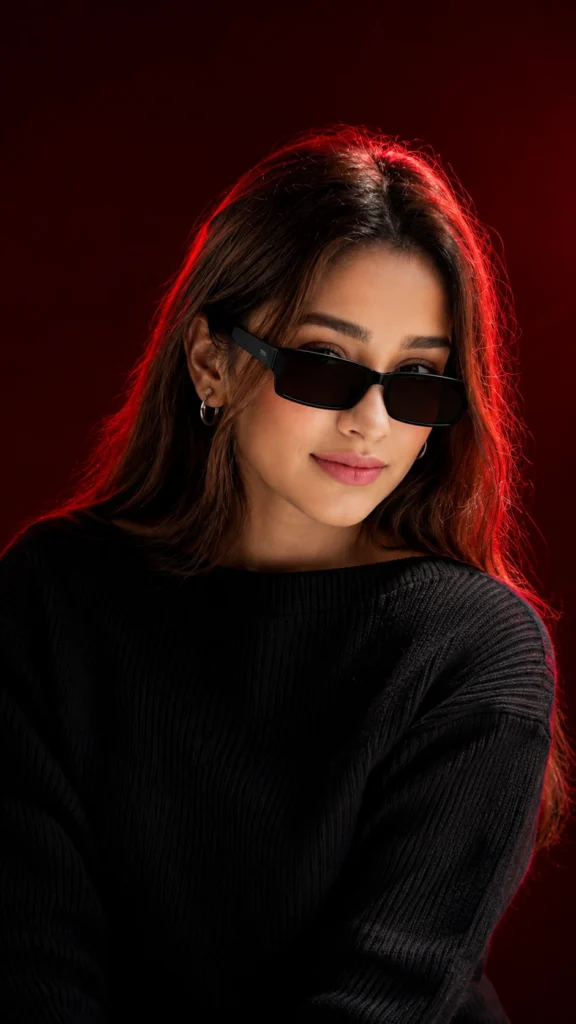
Create Your Red Background Portrait in Minutes
You don’t need professional editing experience to try this trend. Follow these simple steps:
Make the AI Result Look More Premium
A good prompt helps, but your original photo also matters. For better results:
Try Different Red Background Styles
Don’t limit yourself to one red background. You can modify the prompt and try several luxury-inspired variations:
Each option can give the portrait a slightly different mood while maintaining the luxury aesthetic.
Why This Prompt Works So Well
Instead of simply telling the AI to “make a red background,” the prompt describes the complete visual style. It tells the AI how the background, lighting, facial details, composition, and overall mood should work together.
This can help create a portrait with:
Get Different Looks with Simple Follow-Up Prompts
If your first result isn’t exactly what you imagined, you can refine it with short instructions.
Try:
Small changes like these can help you explore different versions without starting from scratch. Also try the Childhood Birthday Memories AI Photo Prompt & Sad Instagram Profile Photo AI Editing Prompt
ChatGPT or Gemini: How to Use the Prompt
You can experiment with the same prompt in ChatGPT and Google Gemini after uploading your image. Results may differ depending on the image, instructions, and image-generation features available in the tool you are using.
The key is to start with the main prompt and then make small adjustments until the lighting and background match the style you want.
Final Words
The Luxury Red Background AI Portrait Prompt 2026 is a simple way to transform a regular photo into something much more striking. With a deep red backdrop, cinemablend with the stylend realistic portrait details, you can create a stylish image without complicated editing.

Hi, I’m Kiara Sharma, a technology writer who writes about useful apps, digital tools, photo editing, and new tech trends. I share simple tips and clear information to help readers understand technology without complicated language.




One Comment